
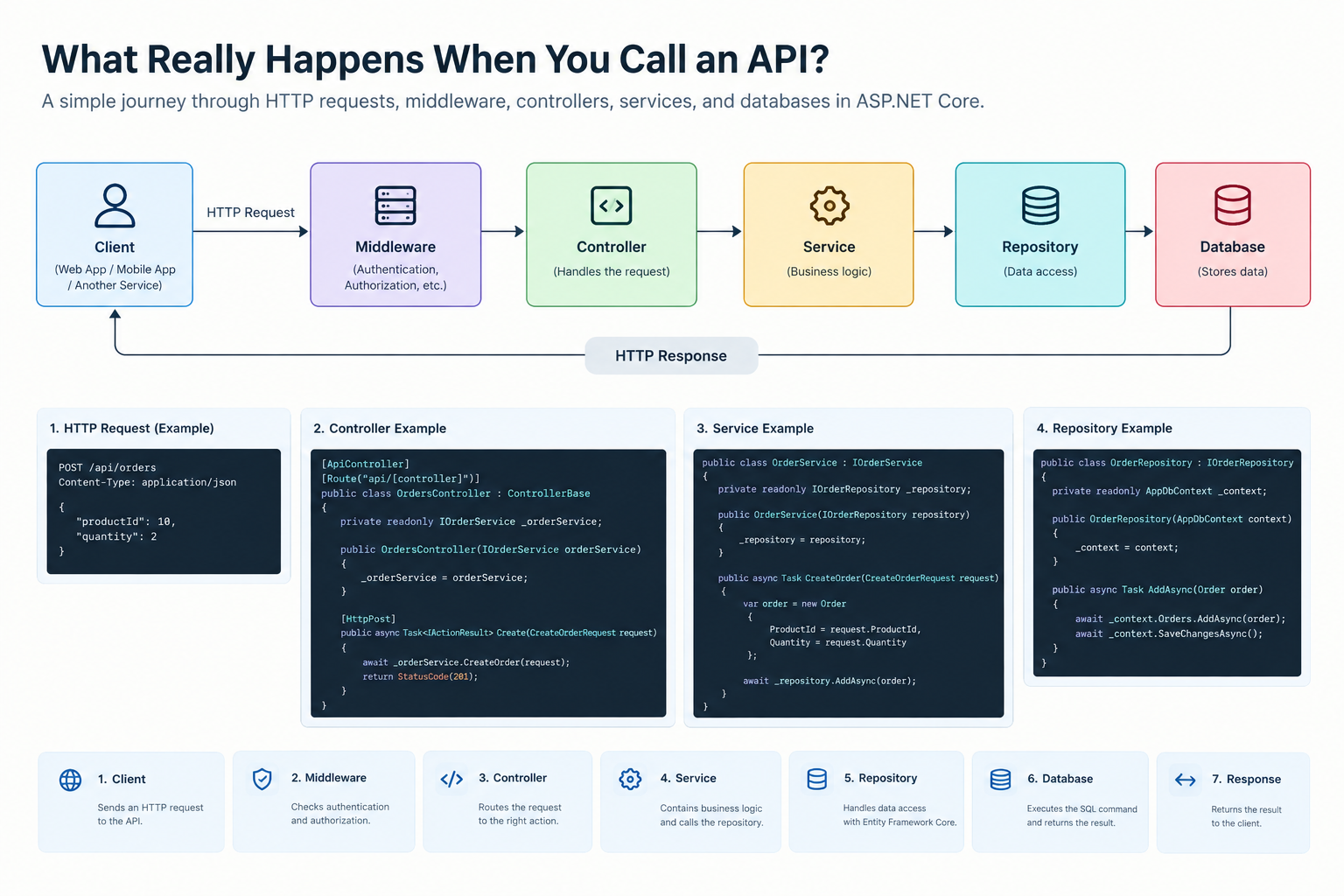
When we click a button in a web application or send an API request, many things happen behind the scenes.
Let's say we want to create a new order:
POST /api/ordersAt first, it looks like we are simply sending an HTTP request. But after the request reaches the server, it goes through several different layers.
We can visualize this journey like this:
Client
   ↓
HTTP Request
   ↓
Middleware
   ↓
Controller
   ↓
Service
   ↓
Repository
   ↓
Database
   ↓
HTTP Response
So, what exactly happens at each step?
1. The Client Sends an HTTP Request
First, the frontend or another application sends a request to the API.
For example:
POST /api/orders
Content-Type: application/json

{
    "productId": 10,
    "quantity": 2
}
The client is telling the server that it wants to create a new order.
An HTTP request contains more than just a URL. It can include an HTTP method, headers, a body, and other information.
2. The Request Goes Through Middleware
When the request reaches an ASP.NET Core application, it doesn't go directly to the Controller.
It first passes through the middleware pipeline.
For example:
app.UseAuthentication();
app.UseAuthorization();
Authentication checks who the user is.
Authorization checks whether that user has permission to perform the requested operation.
We can think of middleware as a set of checkpoints at the entrance of our application.
After the necessary checks are completed, the request continues through the pipeline.
3. The Request Reaches the Controller
ASP.NET Core then determines which Controller and Action should handle the request.
For example:
[ApiController]
[Route("api/[controller]")]
public class OrdersController : ControllerBase
{
    private readonly IOrderService _orderService;

    public OrdersController(IOrderService orderService)
    {
        _orderService = orderService;
    }

    [HttpPost]
    public async Task<IActionResult> Create(CreateOrderRequest request)
    {
        await _orderService.CreateOrder(request);

        return StatusCode(201);
    }
}
When the client sends:
POST /api/ordersASP.NET Core routes the request to the Create method inside OrdersController.
Notice that the Controller doesn't create the service itself. ASP.NET Core provides the IOrderService through Dependency Injection.
But there is an important point here:
The Controller doesn't have to do everything.
Ideally, the Controller should receive the request and pass the required work to the appropriate service.
4. The Controller Calls the Service
We can keep our business logic inside a Service layer.
For example:
public class OrderService
{
    private readonly IOrderRepository _repository;

    public OrderService(IOrderRepository repository)
    {
        _repository = repository;
    }

    public async Task CreateOrder(CreateOrderRequest request)
    {
        var order = new Order
        {
            ProductId = request.ProductId,
            Quantity = request.Quantity
        };

        await _repository.AddAsync(order);
    }
}
Now the Controller doesn't need to know how the database operation works.
It simply calls the Service:
await _orderService.CreateOrder(request);This separation makes our code easier to understand, maintain, and test.
5. The Service Calls the Repository
If the Service needs to store data in the database, it can use a Repository.
For example:
public class OrderRepository : IOrderRepository
{
    private readonly AppDbContext _context;

    public OrderRepository(AppDbContext context)
    {
        _context = context;
    }

    public async Task AddAsync(Order order)
    {
        await _context.Orders.AddAsync(order);
        await _context.SaveChangesAsync();
    }
}
Here, we use Entity Framework Core to save the order to the database.
The Service doesn't need to know the technical details of how the data is stored.
6. The Database Operation Happens
When the Repository executes:
await _context.SaveChangesAsync();Entity Framework Core generates and sends the necessary SQL commands to the database.
It may look roughly like this:
INSERT INTO Orders (ProductId, Quantity)
VALUES (10, 2);
After the database completes the operation, the result is returned to the application.
7. The Response Goes Back to the Client
Once the database operation is completed successfully, the Service finishes its work.
The Controller then returns an HTTP response:
return StatusCode(201);The client may receive:
HTTP/1.1 201 CreatedNow the client knows that the order was successfully created.
So, What Actually Happened?
We sent only one request:
POST /api/ordersBut behind that request, this entire journey took place:
Client
   ↓
HTTP Request
   ↓
Middleware
   ↓
Controller
   ↓
Service
   ↓
Repository
   ↓
Entity Framework Core
   ↓
Database
   ↓
Response
   ↓
Client
This is one of the important things to understand when working with backend applications.
An API is not just a URL.
Understanding how a request moves through an application helps us debug problems, improve performance, design better code, and maintain our applications more easily.
Why Do We Separate These Layers?
Why don't we simply put everything inside the Controller?
Imagine a Controller like this:
[HttpPost]
public async Task<IActionResult> Create(CreateOrderRequest request)
{
    // validation
    // business logic
    // database query
    // logging
    // email
    // other operations...

    return Ok();
}
This approach might work for a small project.
But as the application grows, Controllers can quickly become hundreds of lines long.
Instead, we can separate responsibilities:
Controller  → Handles the request
Service     → Contains business logic
Repository  → Handles data access
Database    → Stores data
This makes it easier to change, test, and maintain different parts of the application.
Final Thought
For a user, sending an API request might be nothing more than clicking a button.
For a developer, however, that click starts a journey.
The better we understand this journey, the easier it becomes to debug, develop, and scale our applications.
Next time you call an API, remember: there is much more happening behind that single request.
Comments
Please log in to leave a comment.